
Operator Library: Hardware Platform
このオペレーターを使用すると、VisualAppletsデザインでCoaXPress over fiber(CoF)カメラにトリガーパケットを送信できます。
このオペレーターは、入力ポートIで指定されたトリガータイプに従ってトリガーパケットを生成します。TXトリガーは4ビットの値で、CXP規格で定義されているトリガータイプを表します。最大16種類の異なるトリガータイプを定義できます。ポートIの有効な入力値ごとに、指定された値と同じタイプのCoFトリガーパケットが送信されます。
このオペレーターは、カメラとフレームグラバー間の接続内にあるTXマスターレーンにドッキングします。デザインルールチェック(DRC)により、対応するカメラオペレーターがインスタンス化されているかどうか、およびCoFCameraとCoFTxTriggerのオペレーター間のマスターレーン選択が一致しているかどうかがチェックされます。エラーが発生した場合、DRCはエラーメッセージを出力し、オペレーターには赤色の背景オーバーレイが表示されます。インスタンス化の順序はありません。CoFCameraとCoFTxTriggerの両方を必要に応じて使用できます。ただし、DRCを通過するには、両方のオペレーターとポートへの正しいマッピングが必要です。
| Available for Hardware Platform |
|---|
| imaFlex 2 Dual 100 |
リソース
オペレーターは、FiberConnectionパラメータの設定をダイアログに読み取り専用パラメータとしてミラーリングします。ダイアログをメニューから開くと、FPGAデバイスリソースを確認できます。デバイスリソースは読み取り専用です:
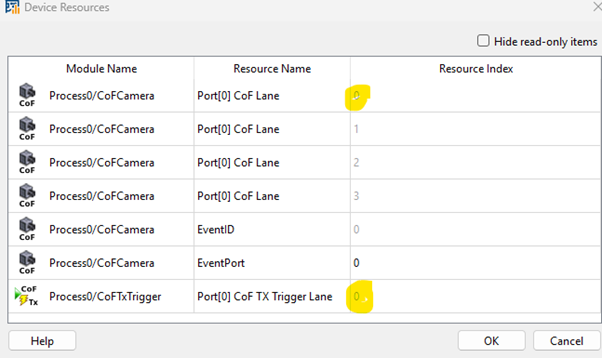
割り当てられたポートに応じて、リソースはPort[0] CoF TX Trigger Laneタイプ、またはインデックス範囲が0〜3のPort[1] CoF TX Trigger Laneタイプになります。トリガーパケットの送信は常にマスターレーンを介して実行されるため、オペレーターは常に1つのレーンのみを割り当てます。
信号出力ポート
トリガーパケットの処理状態を示すステータス信号出力ポートがいくつかあります。これらのポートは、動作中のトリガー信号の状況に関する情報を提供します。
-
TriggerSent:このポート上のパルスは、トリガーパケットが接続されたカメラに正常に送信されたことを示します。
-
TriggerAck:このポート上のパルスは、送信されたトリガーパケットが接続されたカメラによって確認応答(ACK)されたことを示します。
-
TriggerOverRequest:このポート上の高レベルの値は、オーバーリクエスト状態を示します。これは、1つのトリガーパケットの送信時間枠内に、入力ポートに供給されるトリガー値が多すぎる場合に発生します。この状況では、前のトリガーがまだ送信中であるため、次のトリガーを送信できません。
CoaXPress(CXP)規格によると、前のパケットが確認応答されるかタイムアウト(480ナノ秒)するまで、次のトリガーパケットを送信してはなりません。
![[注]](../common/images/admon/note.png)
VisualAppletsではこのルールに違反することができます VisualAppletsでは、カメラにより高いトリガーレートや、異なるタイプの重複するトリガーイベントが必要な特殊なケースにおいて、意図的にこのルールに違反することができます。このような場合、システムは2つのトリガーパケットが重複しないことのみをチェックします(最小ギャップ:33.28ナノ秒)。これは、CXP規格で定義されている480 nsのタイムアウトよりもはるかに短いです。
-
TriggerLost:このポート上のパルスは、送信されたトリガーパケットが、480ナノ秒のタイムアウト時間内に接続されたカメラによって確認応答されなかったことを示します。
| Property | 値 |
|---|---|
| オペレータータイプ | M |
| Input Link | I、トリガータイプ |
| Output Links | TriggerSent:トリガーパケットが正常に送信されたことを示します TriggerAck:送信されたトリガーパケットが確認応答されたことを示します TriggerOverRequest:オーバーリクエスト状態を示します TriggerLost:送信されたトリガーパケットが確認応答されなかったことを示します |
| Link Parameter | Input Link I | 出力リンク TriggerSent | 出力リンク TriggerAck | 出力リンク TriggerOverRequest | 出力リンク TriggerLost |
|---|---|---|---|---|---|
| Bit Width | 4 | 1 | 1 | 1 | 1 |
| Arithmetic | unsigned | unsigned | unsigned | unsigned | unsigned |
| Parallelism | 1 | 1 | 1 | 1 | 1 |
| Kernel Columns | 1 | 1 | 1 | 1 | 1 |
| Kernel Rows | 1 | 1 | 1 | 1 | 1 |
| Img Protocol | VALT_PIXEL0D | VALT_SIGNAL | VALT_SIGNAL | VALT_SIGNAL | VALT_SIGNAL |
| Color Format | VAF_GRAY | VAF_GRAY | VAF_GRAY | VAF_GRAY | VAF_GRAY |
| Color Flavor | FL_NONE | FL_NONE | FL_NONE | FL_NONE | FL_NONE |
| Max. Img Width | any | 指定なし | 指定なし | 指定なし | 指定なし |
| Max. Img Height | any | 指定なし | 指定なし | 指定なし | 指定なし |
| FiberConnection | |
|---|---|
| タイプ | 静的書き込みパラメータ |
| Default | port_0_lane_0 |
| 範囲 | {port_0_lane_0, port_1_lane_0} |
|
このパラメータは、カメラが接続されているQSFP28ポートと、そのポートのどのレーンがマスターレーン(トリガーパケットを送信できるレーン)であるかを定義します。 4レーンを持つカメラ構成のみがポート0およびポート1でサポートされています。したがって、CoFTxTriggerは両方のポートでレーン0のみを使用できます。 選択されたQSFP28ポートは、そのポートのAppletPropertiesオペレーター内のFiberProtocolパラメータがDataForwardingではなくCoFに設定されている場合にのみ使用できます。 FiberProtocolがDataForwardingに設定されており、CoFTxTriggerオペレーターがそのファイバーポートへのマッピングを試行した場合、デザインルールチェック(DRC)によってエラーメッセージが生成されます。この場合、FiberConnectionパラメータには競合マーク(赤色)が付けられ、カーソルを合わせると、競合を説明するクイックチップヘルプメッセージが表示されます。 同じハードウェアQSFP28ポートの同じレーンを使用できるCoFTxTriggerオペレーターは1つだけです。複数のオペレーター間のマッピングは、デザイン全体で一意である必要があります。 CoFTxTriggerオペレーターは、同じマスターレーン上にCoFCameraオペレーターが存在することを想定しています。この条件が満たされない場合、FiberConnectionパラメータには競合マーク(赤色)が付けられ、カーソルを合わせると、競合を説明するクイックチップヘルプメッセージが表示されます。 |
|
 前へ
前へ

